

Color Folder Master
Read our comprehensive review of Color Folder Master for Mac. Learn how this productivity tool helps you customize and organize folder colors in Finder.
Streamline Your macOS Finder with Color Folder Master
Color Folder Master folder customization provides a simple yet highly effective way to break free from the monotonous blue folders that dominate the macOS Finder. For professionals who manage hundreds of project files daily, visual clutter can significantly slow down productivity. Developed by Nanjing Oumi Software Development Co., Ltd., this utility addresses that specific bottleneck by allowing users to assign distinct, vibrant colors to individual directories.
Who Benefits Most from Custom Folder Colors?
While any Mac user looking for a cleaner workspace will appreciate the utility, certain professionals will find it indispensable:
- Creative Professionals: Designers and video editors can color-code assets by project stage (e.g., green for completed, red for urgent, yellow for in-progress).
- Software Developers: Easily distinguish between active repositories, archive folders, and local environments at a quick glance.
- Administrative Teams: Organize client folders or financial documents by year or priority level using custom color-coding.
Key Features of Color Folder Master
The beauty of this application lies in its straightforward, distraction-free workflow. Here is what makes the utility highly practical:
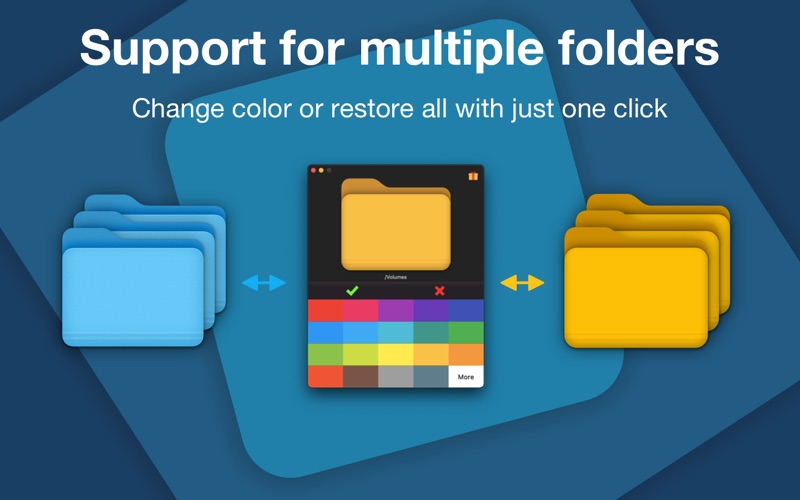
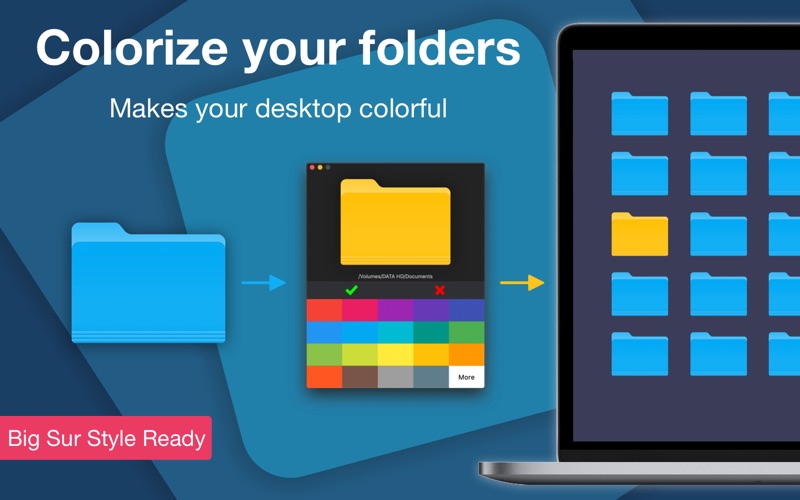
- Intuitively Simple Drag-and-Drop: To modify a folder, you simply drag it directly from Finder into the designated drop zone within the application window.
- Instant Color Application: Select your preferred hue from the color palette, and the changes are applied immediately to the target directory.
- Enhanced Visual Hierarchy: By moving away from uniform blue folders, you train your brain to visually locate key directories in a fraction of a second.
How It Works in Daily Use
Using the application requires no complex technical configuration. Once opened, you are presented with a minimalist interface featuring a central drop zone. You choose a folder, drag it over, select the desired color, and save. This seamless interaction makes it easy to integrate the tool into your existing file management routine without interrupting your creative flow.
Final Verdict
If you find yourself losing precious seconds searching through a sea of identical blue directories, investing in a visual organizational system is highly recommended. To elevate your digital workspace management, head over to the official Mac App Store to explore the features of Color Folder Master today.